This post is probably one of the longest I have in my blog, but trust me, it’s 100% written by me, no AI slop, gluten free XD
Hi everyone! In this post I’m going to talk about Firecracker and MicroVMs and their importance during this new AI era we are living in. This is more like a summary of the talks I presented at the AWS Community Day Colombia 2026 and AWS Community Day Bolivia 2026. I received some messages from folks interested in this topic, so I feel happy to share it here!
I prepared a talk and submitted it to AWS Community Day Colombia and Bolivia where I had the pleasure to share this topic! I have to admit it, it feels great to see your name on their agenda pages along with other people I admire.

Why I proposed this talk
I checked Firecracker for the first time back in 2021 (more on that below). A couple of years later when I had a use case for this, I found out I couldn’t use it in a real AWS environment as it required metal EC2 instances (the ones that have KVM enabled). Unfortunately before February 2026, you could have nested virtualization only on metal instances which had way more specs than I needed for PoCs, and of course were expensive.

In February of this year (2026), AWS announced Nested Virtualization on their c8, m8 and r8 instance families and this time you didn’t require metal instances, you could start using nested virtualization on c8i.large instances which is way more affordable than a metal instance.
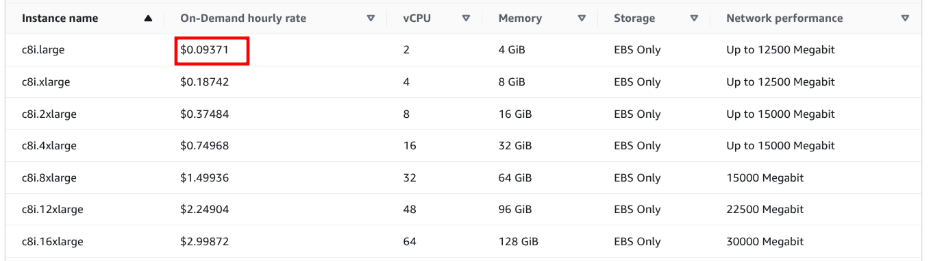
When I read that announcement, Firecracker was the first thing that came up to my mind! So I started playing with it again, but now focused on how important sandboxing is from the security point of view during this AI era we are living in. With all the security incidents that have been happening since last year, I consider that sandboxing plays an important role in how we deploy things nowadays, we can be deploying malicious code, not because we’ve been compromised, but a library we might be using was.
During the last months we had:
- Supply chain attacks (some successful others that could have been) e.g. Axios, TanStack, xz
- Kernel exploits, only during 2026 we had CopyFail, DirtyFrag
- OpenAI’s attack to Hugging Face
- And in general, threat actors + AI is getting more common everyday
I focused most of my presentation in terms of security and containers and how Firecracker and MicroVMs can help. We know that containers are powerful, we can deploy multiple isolated containers with our services in a single host (ECS + EC2, Kubernetes, Docker Compose). We have the benefits of using only the resources our service requires and isolation via namespaces, however one of the possible caveats in terms of security is that containers share the same kernel with the host. If one of our services turns out to have an RCE vulnerability, and there exists a new kernel exploit that allows us to escape the container, the host machine plus the other services that run in that same host, are technically compromised as well.
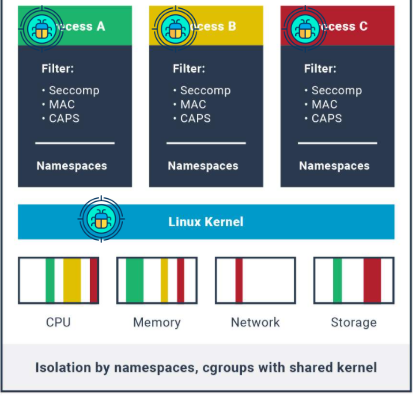
Of course there are different practices that could reduce or prevent these risks during the development phase, like having static code analysis, constant patching of our servers, etc. But when something is fresh and recently disclosed, there is a window of time where the risk is higher.
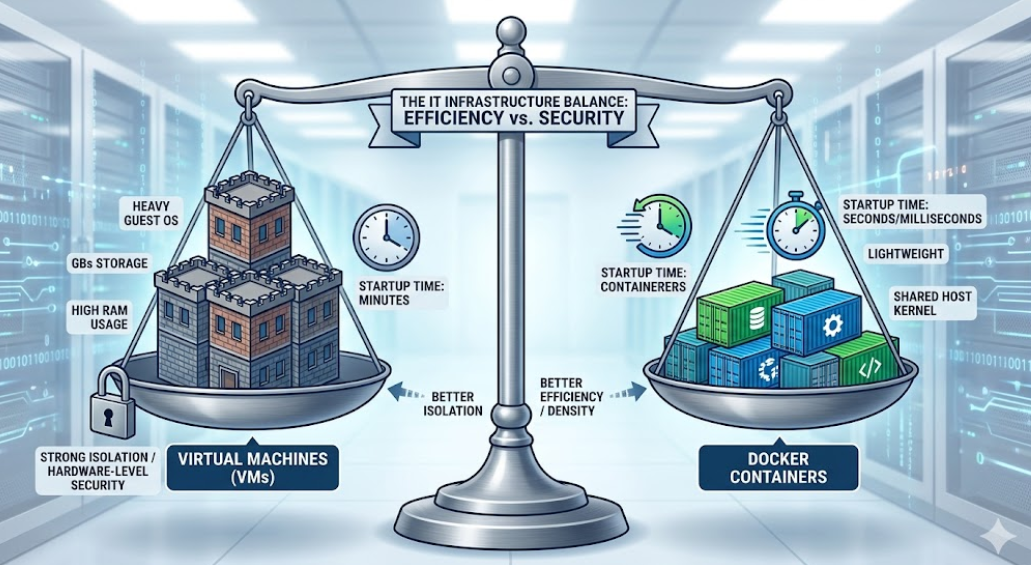
On the other side of containers, we have Virtual Machines, which have a “more robust” security structure in terms of isolation (see the “update October 2026” section at the end for a recent vulnerability discovered on KVM). The caveat with virtual machines as we know them (KVM, Hyper-V, VMware, etc) is that they consume more resources and their boot time is longer compared to containers.
So on one hand we have containers, resource efficient and with a fast start time, with the condition that they share a kernel that could be a risk. On the other side, we have virtual machines, which have a more robust security isolation taking advantage of hardware virtualization, but with the condition that they are usually heavy in terms of resources and a longer boot time.
So, based on that, can’t we have the best of both worlds?
Let me introduce you to Firecracker, the hidden open-source jewel from AWS
The first time I read about Firecracker was in 2021 thanks to Julia Evans (I’m a big fan of all the work she posts online) and her post “Firecracker: start a VM in less than a second”. To be honest, that title really caught my attention, starting a VM in less than a second, it’s got to be something interesting. To my surprise I discovered Firecracker was an open source project from Amazon Web Services, my favorite cloud provider that I’ve been using since 2016.
I followed that post’s instructions and voila! I had my first micro virtual machine running in less than a second as well, I was surprised!
Firecracker is a virtualization technology that allows you to create light virtual machines (microVMs) with the speed and resource efficiency of containers, which in my opinion makes sense. It is built using Rust which gives Firecracker the security benefits that Rust has.
In its beginnings Firecracker was a fork from CrosVM, then it took its own shape
It is important to note that Firecracker requires KVM under the hood, which is available on most physical Linux servers, and on AWS on metal instances and standard instances of the families: c8, r8, m8 (thanks to nested virtualization).
Firecracker is currently used to give an extra layer of security and sandboxing to different services: AWS Lambda, AWS Bedrock AgentCore, AWS Lambda MicroVMs, with AWS Lambda being the service that has been using this since at least 2018! Before knowing that Firecracker existed, I thought that AWS Lambda used some sort of container technology, not docker as such, but something similar that uses seccomp, cgroups and namespaces. But knowing that you can start virtual machines in milliseconds, with reduced resource requirements (other than the resources the application that will execute requires), it totally makes sense that AWS Lambda uses this type of technology for the execution of millions and millions of Lambda functions which might contain untrusted code, a very clever way to protect themselves and offer a great service!
With that in mind, we can answer the question previously asked, Firecracker combines the best of both worlds, having its own kernel with a low resource consumption and fast startup time!
Firecracker documentation is not as “fancy” as other projects such as Docker, however if you read the markdown documentation with care, you will be able to run your own VMs without complications!
Firecracker Limitations
- You need to build a custom Linux kernel image, it is not an impossible task, but you need to be familiar with the basics of compiling a kernel.
- Because Firecracker boot time is just milliseconds, Firecracker microVMs only support 4 devices:
virtio-net: network supportvirtio-block: raw block storage supportvirtio-vsock: for host-to-microvm communication- A keyboard with a single key (the reboot key)
- Firecracker does not support USB, BIOS, ACPI or PCI/GPU
- PCI support was under development and added on Aug 2025
No vendor lock-in
As I mentioned before, if you are using AWS Lambda, AWS Bedrock AgentCore, AWS Lambda MicroVMs, you are already using Firecracker under the hood, so there is no need to implement anything new. However, not everyone might be using those services, or not even using AWS whatsoever. What I like about Firecracker is that it is open-source and not an AWS service as such. So it is possible to use it anywhere you want (on-prem, other cloud providers), as long as you have KVM enabled i.e. you can see the /dev/kvm device.
As a matter of fact, there are companies such as Fly.io which use Firecracker for all their compute services.
However if you want to use Firecracker at scale, it’s most likely that you will need to create an abstraction around it for its orchestration. In the next section (MicroVMs Orchestration with Kata Containers) we will see just that.
Firecracker and its influence
After Firecracker was released and made open to the public, other projects were born to achieve the same goal, fast MicroVMs from the lessons learned from Firecracker.
- Cloud Hypervisor: Is the recommended runtime for Kata Containers (we will see that in the following section). Designed based on the lessons learned from Firecracker.
- Docker Sandboxes. Although it does not have any direct relation with Firecracker, they follow the same idea of creating containers (sandboxes) with their own kernel isolation.
First demo
I prepared different demos, the first one is to create an example virtual machine on an EC2 instance with nested virtualization enabled. The terraform code for this demo can be found here.
And this is a short video (no audio), running the same demo.
In the next section I will show you how to orchestrate MicroVMs in Kubernetes environment using Kata Containers.
MicroVMs Orchestration with Kata Containers
When running a Kubernetes cluster, it’s most likely that we will have multiple nodes running different services in those nodes in different containers. As I mentioned above, one of the security caveats is the fact that all those containers will be sharing the host kernel. This brings an attack vector for a scenario like this:
- One of the services has a RCE vulnerability
- There is an ongoing kernel exploit for Local Privilege Escalation, similar to the ones released some months ago i.e. CopyFail, Dirty Frag
- Escaping the container
- Owning the host
- The rest of containers running in the same node compromised
As we mentioned, Firecracker lets us combine the best of the container world and the VMs world in terms of security and speed.
And that is what Kata Containers is, it is a container runtime that allows us to create lightweight micro VMs that will run the container inside it, so the startup of our services will have its own kernel isolation and it will just add some milliseconds to its startup time.
Something I like about Kata Containers is that if you already have Kubernetes running, you won’t need to do big changes to start using Kata Containers in some of your services to start testing. All it needs is to specify the runtimeClassName field in the Pod/Deployment specification.
Kata Containers supports different runtimes:
- Cloud Hypervisor (recommended)
- Firecracker
- QEMU
- Dragonball (not that Dragonball xD)
Demo - Installing
Installing Kata Containers in an existing cluster is pretty simple, I used an existing EKS cluster:
The commands and steps used are documented in the Github repository where all the demos are published.
Demo - Cloud Hypervisor
Changing an existing Deployment to use Kata Containers and its own kernel isolation is just adding the runtimeClassName to the Pod/Deployment specs. It works out-of-the-box without extra configurations.
apiVersion: v1
kind: Pod
metadata:
  name: kata-clh-smoketest
spec:
  runtimeClassName: kata-clh # <<<<<< This will make the pod to have its own kernel
  restartPolicy: Never
  containers:
    - name: shell
      image: public.ecr.aws/docker/library/alpine:latest
      command: ["sleep", "infinity"]
      resources:
        requests:
          cpu: "100m"
          memory: "128Mi"
        limits:
          cpu: "250m"
          memory: "256Mi"
Demo - Firecracker
Running Firecracker with Kata Containers has some extra challenges and after containerd v2 was released there are some issues.
First, we need to make containerd able to use device-mapper, which will be used to download and unpack the layers of the docker image inside our microVM. The settings and the required steps for that are in the demo repository.
However, as we can see on the next video, container creation fails while trying to extract the layers of the Docker image of our pod, even though we have the proper device mapper settings which are recommended to run Firecracker with Kata containers.
The reason is that after containerd upgraded to v2, there are some changes that broke unpacking layers of a Docker image when using device-mapper. There are still two open issues on Github, there are some workarounds like the --local flag, but in general that makes Firecracker unfortunately not a good option for Kata Containers.
- https://github.com/containerd/containerd/issues/11390
- https://github.com/containerd/containerd/issues/11606
Demo - Network Connectivity between services
This final demo shows (with Cloud Hypervisor) that our Deployments can connect between each other as pods without issues, even though they have their own kernel.
The following years will be nuts! (update October 2026)
Nothing is 100%, as there is a very well-known quote in the industry that says:
if you think your network is secure because you have a firewall, remember there is a teenager somewhere in the world trying to break in right now just for fun.
In our case, one might say that adding its own kernel to each pod will make it 100% secure. WRONG!. We are just adding an extra layer of security, which will put more barriers to an attacker in case one Pod is compromised. However, some days ago, Vercel confirmed that they found a KVM zero-day vulnerability, which is crazy! Of course it won’t be disclosed until patched (responsible disclosure). Link.
We’ve confirmed a KVM 0day through our Vercel Sandbox bounty program. Affecting the industry’s gold standard solution for Linux virtualization.
— Guillermo Rauch (@rauchg) October 3, 2026
2026 is wild! Thankful to Paulos and other researchers helping us make the most secure sandbox for agents. Full writeup coming. https://t.co/75dXWh9okX
During the last 10 years working as DevOps Engineer, security became a first-class citizen in most of the organizations I worked for, which is important and I feel happy about that, however with the rise of AI and agents, the following years will get nuts! If you are in charge of critical infrastructure, today more than ever, constantly patching, sandboxing as much as possible, will be way more important.
Final Thoughts
Today cyber security threats are getting bigger, and if we are deploying, operating and exposing services to clients, it is important to take security way more seriously than ever, sandboxing is one way to do it. But in general, embracing security from the first commit until that same commit goes to production. Embrace the DevSecOps culture!
If you are interested in all the MicroVMs ecosystem in general, I recommend you to take a look at this repository.